Updated October 7, 2026
Most project management software roundups are written by people who spent an afternoon reading other roundups. You can tell because they all have the same tools in the same order with the same vague praise: "great for collaboration," "intuitive interface," "scales with your team."
What's new (September 23, 2026): Basecamp overhauled its pricing in early September 2026, eliminating per-seat billing altogether. According to co-founder Jason Fried and Basecamp's own pricing page, the lineup now runs from a Free plan through Freelancer ($25/month), Studio ($59/month, unlimited users), Pro ($99/month, unlimited users), and Unlimited ($299/month billed annually, unlimited projects and users) - all priced by project count and storage rather than seats. Existing customers keep their old plans, but any team signing up today gets the new structure, which is a materially different value proposition than the flat yearly deal this guide previously described.
Advertisement
What's new (October 7, 2026): Linear has rolled out "Coding Sessions," letting Linear Agent write and ship code on its own using Claude Code or Codex: assign it an issue, or ask it in a comment or Slack thread, and it investigates the bug across the codebase, writes a fix, tests the result in a real browser with before-and-after screenshots, and returns a diff for review. According to Linear's own changelog, the feature already resolves around 30% of incoming bug reports internally on the first attempt. It is available on the Basic, Business, and Enterprise plans but billed separately from seat pricing: model tokens at the provider's own rates, plus $0.25 per 20-minute sandbox block, with admin-configurable spending caps. For the technical teams this guide already points toward Linear, that is a real cost variable worth budgeting for alongside the per-seat price.
This one is different. Small teams have specific problems that enterprise-focused software actively makes worse - too many features, too much setup, too much cost per seat for a team of four or eight people trying to ship work without drowning in process. The tools below were picked specifically for that context.
Here is what actually works in 2026, who each tool is right for, and - equally important - who should avoid it.
What Small Teams Actually Need From Project Management Software
Before the tool list, it is worth being clear about what small teams need that is different from what large organisations need.
Small teams do not need portfolio dashboards, resource allocation matrices, or approval workflow builders. They need to know who is doing what, by when, and whether anything is blocked. They need a tool that takes under an hour to set up and does not require a dedicated administrator to maintain. They need pricing that does not punish them for being small.
The features that matter at small team scale: task assignment with clear ownership, deadline tracking, some form of status visibility across the team, and enough communication context that you are not constantly switching to a separate chat tool to figure out what is happening on a task. Everything beyond that is noise until your team grows past it.
With that filter in place - here is the 2026 list.
1. Linear - Best Overall for Small Technical Teams
If your team builds software and you are not using Linear, you are probably using something slower and more frustrating without realising it.
Linear launched as a reaction to Jira - specifically as a reaction to the fact that Jira had become so feature-bloated that simple teams were spending more time maintaining their project management system than actually working. Linear stripped the concept back to what matters: clean issue tracking, fast keyboard-driven navigation, cycle management, and a design that does not make you feel like you are filling out a government form every time you create a task.
In 2026, Linear has added AI-powered issue triage that automatically suggests priorities, labels, and assignees based on past patterns. It has also deepened its GitHub, GitLab, and Linear Accelerate integrations so that pull requests automatically update issue status without anyone manually closing tickets.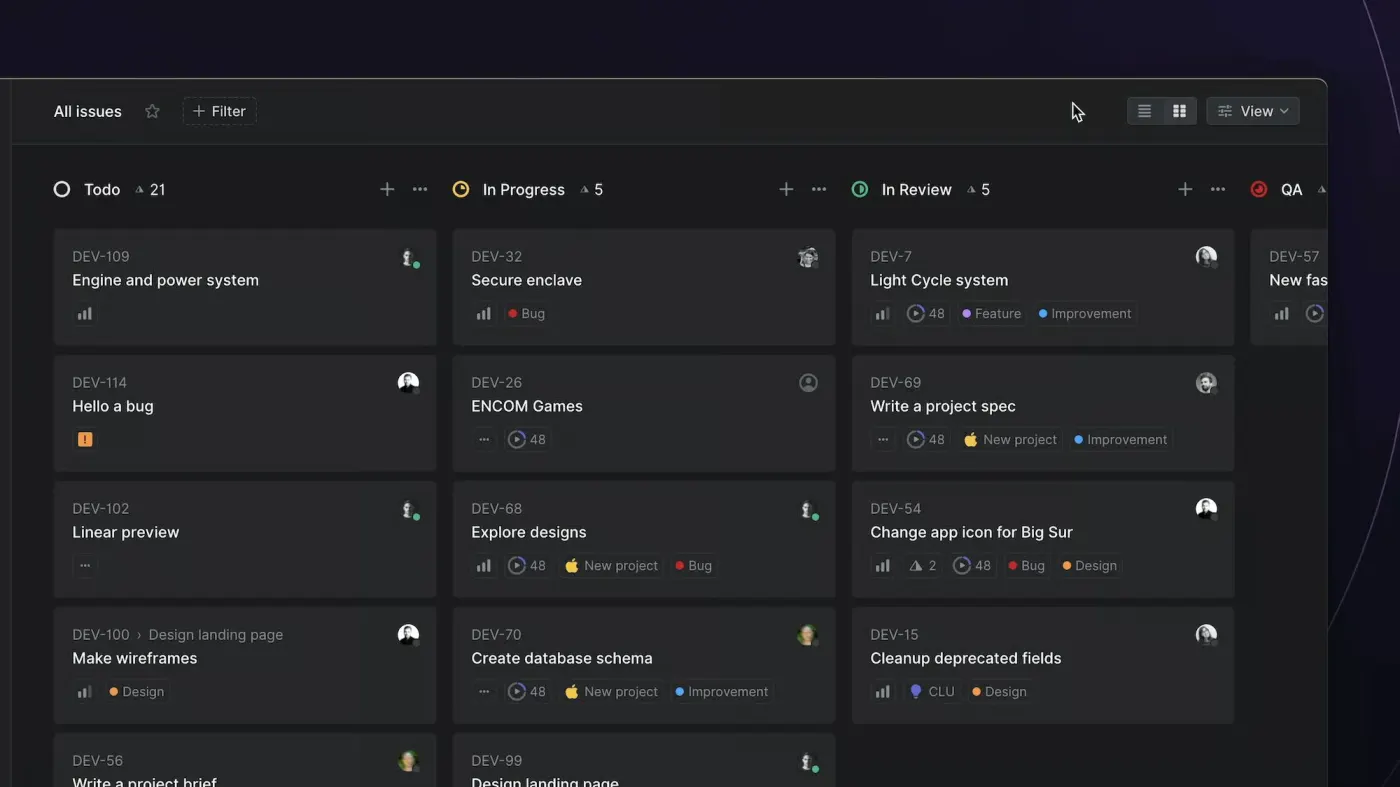
The honest limitation: Linear is built for engineering teams. If your small team is a mix of developers and non-technical people - designers, marketers, operations - the interface makes more sense to the developers and less to everyone else. For a pure dev team of two to ten people, it is genuinely the best tool available.
Pricing: Free for small teams up to a generous limit (unlimited members, capped at 250 issues across two teams). Paid plans start at $10 per user per month on the Basic tier, billed annually, with a Business tier at $16 per user per month.
Best for: Software development teams, startups with technical founders, engineering squads inside larger organisations.
Not ideal for: Mixed teams, agencies managing client projects, non-technical workflows.
2. Notion - Best for Teams That Also Need a Knowledge Base
Notion occupies a category of its own because it is not really a project management tool. It is a workspace - part wiki, part database, part task tracker - and the project management capability sits inside a broader system for organising how your team knows things.
For small teams where the cost of context-switching between "where we track tasks" and "where we document things" is high, Notion's all-in-one approach is genuinely valuable. Your project tracker can live next to your onboarding docs, your meeting notes, your client briefs, and your SOPs - all searchable, all linked, all in one place.
Advertisement
The 2026 version of Notion has improved significantly on the project management side. Notion AI now handles meeting summaries, draft task creation from notes, and project status summaries that pull from across your workspace. Note that full access to these AI features now sits behind the Business plan: Free and Plus users get only a limited AI trial, according to Notion's own pricing page. The database views - board, timeline, calendar, table - are genuinely flexible for teams that need different perspectives on the same work.
The limitation is that Notion rewards investment. A team that sets it up thoughtfully and maintains it well gets enormous value. A team that creates a few pages and then lets it accumulate chaos will find it less useful than a simple to-do list. If nobody in your team has the inclination to be a part-time Notion architect, it can become more of a liability than an asset.
Notion also does not handle time-sensitive, deadline-driven project tracking as cleanly as purpose-built tools. If your work is primarily deadline-driven with hard delivery dates and client dependencies, something like ClickUp or Asana will serve you better.
Pricing: Free plan covers up to 10 guests and unlimited pages - genuinely useful for very small teams. Plus plan at $10 per user per month for growing teams. Business plan at $20 per user per month, now required for full Notion AI access.
Best for: Small teams that want one tool for everything - tasks, docs, wikis, and databases. Content teams, consultancies, startups in early stages.
Not ideal for: Teams with complex deadline management, time tracking requirements, or client billing workflows.
3. ClickUp - Best for Teams That Want Everything in One Place
ClickUp's pitch has always been aggressive: it replaces every other tool you use. Task management, docs, goals, time tracking, chat, whiteboards, forms - all inside one platform. For small teams trying to reduce subscription sprawl, that proposition is genuinely attractive.
The honest version: ClickUp is the most feature-rich option on this list and also the most overwhelming one. The setup complexity is real. A small team picking it up without any prior experience will spend more time configuring it than teams using simpler tools.
That said, for teams that invest the setup time, ClickUp delivers genuine depth. The customisation is exceptional - you can build workflows that match exactly how your team works rather than adapting your work to the tool's assumptions. Custom statuses, custom fields, custom views, automation rules that trigger based on almost any condition - if you need it, ClickUp probably has it.
In 2026, ClickUp's AI features have matured considerably. ClickUp Brain handles task summaries, status updates, and predictive task creation well enough that teams using it consistently report meaningful time savings on administrative overhead. The AI is particularly strong at synthesising information across tasks and projects - giving you a coherent picture of where things stand without manually checking every item.
Pricing: Free plan is functional for small teams. Unlimited plan at $7 per user per month is where most small teams will land for full functionality.
Best for: Small teams with complex workflows, multiple projects running simultaneously, or teams actively trying to consolidate multiple tools into one subscription.
Not ideal for: Teams that want to be up and running quickly, or teams with limited appetite for configuration and maintenance.
4. Asana - Best for Non-Technical Teams With Structured Workflows
Asana is the tool that project managers reach for when they need something reliable, well-supported, and broadly accessible to people who are not developers or particularly technical.
It has been around long enough to have excellent workflow templates, mature integrations with almost every tool a small business might use, and a support infrastructure that faster-moving startups cannot match. If your team works with clients, has approval workflows, or needs to track dependencies across tasks clearly, Asana handles these better out of the box than most competitors.
✦ Free Newsletter ✦
Never miss a story
Tools, tutorials and AI deep-dives - straight to your inbox, every week.
The 2026 version has added Asana AI, which assists with workload balancing - flagging when a team member is over-assigned relative to deadlines - and automated progress reporting that generates project status updates from task data. For a small team where the project manager is also doing the work, automated reporting is a genuine time-saver.
The pricing model is Asana's most significant limitation for small teams. The free tier is functional but limited, and the Starter plan (renamed from Premium) at $10.99 per user per month is noticeably more expensive than competitors offering comparable features. For a team of eight people, that adds up to meaningful monthly spend.
Advertisement
Pricing: Personal (free) for teams up to 10 with basic features. Starter (formerly Premium) at $10.99 per user per month, Advanced (formerly Business) at $24.99 per user per month.
Best for: Marketing teams, agencies, operations teams, non-technical small businesses, teams with structured approval workflows.
Not ideal for: Budget-conscious teams, developers who want code-native integrations, teams looking for a single tool that also handles documentation.
5. Trello - Best for Simple Visual Workflows
Trello is the tool you reach for when the others feel like overkill.
If your team's workflow is genuinely simple - a card moves from To Do to In Progress to Done and that captures 90% of what you need to track - Trello's Kanban-first interface is fast to set up, easy for anyone to understand without training, and free at a generous tier.
It is not trying to replace Jira or compete with ClickUp on features. It is trying to give you a visual board that anyone can use immediately, with enough customisation to be genuinely useful without enough complexity to become a burden.
The Power-Ups system extends Trello's capability - calendar view, time tracking, automation, custom fields - but each addition requires a separate integration. Teams that need significant customisation often find they spend more time managing Power-Ups than they would using a more integrated tool from the start.
Where Trello still wins in 2026 is onboarding time. If you need a new client, contractor, or team member to understand your project status in ten minutes, Trello boards communicate visually in a way that denser tools cannot match.
Pricing: Free plan is genuinely useful for small teams. Standard plan at $5 per user per month for Power-Ups and automation.
Best for: Very small teams or solo operators with simple workflows, teams onboarding external collaborators frequently, anyone who just needs a visual task board without complexity.
Not ideal for: Teams with complex multi-stage workflows, dependency tracking requirements, or need for detailed reporting.
6. Basecamp - Best for Remote Teams Who Want Calm Over Complexity
Basecamp has a specific philosophy built into its design: software should reduce anxiety, not create it. No individual task assignments with due dates everywhere, no burndown charts, no velocity metrics. Instead: message boards, to-do lists, schedules, file storage, and a check-in system that replaces daily standups with async status updates.
For remote teams that have found synchronous meeting culture exhausting and notification-heavy tools more distracting than productive, Basecamp's structure is deliberately calming. Everything has a clear home. There is no configuration rabbit hole. New team members understand it within an hour.
The trade-off is that if you need granular task tracking, time logging, or detailed analytics, Basecamp will feel limited. It is not built for that. It is built for teams that want a clear, organised workspace with minimal administrative overhead and no feature creep.
Basecamp's pricing changed substantially in September 2026. It now runs Free (one project) through Freelancer at $25 a month (three projects), Studio at $59 a month (ten projects, unlimited users), Pro at $99 a month (25 projects, unlimited users), and Unlimited at $299 a month billed annually (unlimited projects, 1TB storage). None of the paid tiers charge per seat - the caps are on project count and storage instead of headcount, which is a change from the single flat annual plan this guide previously described.
Pricing: Free plan available (one project). Paid tiers run from $25 to $299 a month depending on project and storage limits, none charging per seat; the top Unlimited tier is $299 a month billed annually for unlimited projects and users. Free 30-day trial (45 days on Unlimited).
Best for: Remote-first small teams, teams that have found other tools too noisy, businesses where async communication is the primary mode of collaboration.
Not ideal for: Teams needing detailed task analytics, time tracking, or complex dependency management.
Height Has Shut Down
Earlier versions of this guide recommended Height as an underrated, Linear-like pick for small teams. That recommendation no longer holds: Height shut down on September 24, 2025, after founder and CEO Michael Villar announced the closure in March 2025. The company was not acquired - workspaces simply stopped functioning at shutdown, and no official successor product was named.
If Height's pitch was the draw - fast, keyboard-driven, developer-friendly, but with more room for non-technical collaborators than Linear offers - the closest fits among the tools above are Linear for a technical team or Notion for a mixed one. Neither replicates Height's AI-driven sprint planning exactly, so budget time to re-evaluate your workflow rather than expecting a drop-in swap.
Advertisement
How to Actually Choose
The framework that cuts through the noise: start with your team's primary use case and work backwards.
Building software - Linear first, nothing else comes close.
Mixed team needing tasks and documentation together - Notion, with the caveat that someone needs to own the setup.
Non-technical team with structured approval workflows - Asana.
Remote team prioritising calm async communication - Basecamp.
Complex multi-project environment where you want one tool for everything - ClickUp, if you have the patience for setup.
Simple visual board, minimal overhead - Trello.
Wanted something like Height - it shut down in 2025; Linear or Notion are the closest fits depending on how technical your team is.
The single worst decision a small team makes with project management software is choosing based on features rather than fit. The most capable tool in the world is useless if your team finds it annoying to open. Adoption is the only metric that matters at small team scale - and adoption comes from tools that feel right to use, not tools that win feature comparisons.
Pick the one your team will actually open every morning. That is the right tool for you.
Sources

Advertisement